Nagad Payment Gateway
A Nagad payment gateway gives merchants in Bangladesh a local pay-in option for online, in-person, and chat-based sales. Merchant integration may use an API or no-code tools, depending on the checkout and operating model. Before launch, confirm the account’s transaction limits, eligible business category, settlement terms, and failure workflow with the provider. These conditions are account-specific and should not be assumed. A declined, canceled, or unresolved payment must remain unfulfilled until the merchant verifies its final status rather than relying only on the customer’s screen.
What Makes Nagad Integration with Paykassma Unique?
Paykassma presents several channels for Nagad payment gateway integration. Options include a payment link for remote checkout and a merchant QR for counter or point-of-sale use. Telegram accept flows support chat-based orders, while an API connects automated websites or applications. Merchants should confirm during onboarding that the required channel is available for their account and use case.
The operating choice matters. Links can suit invoices, social sales, and stores that do not need a custom checkout. QR acceptance can reduce manual data entry at a physical location. Telegram payment requests can keep the order and payment prompt in the same conversation. An API fits workflows that require automatic order matching, status updates, or a customized customer journey.
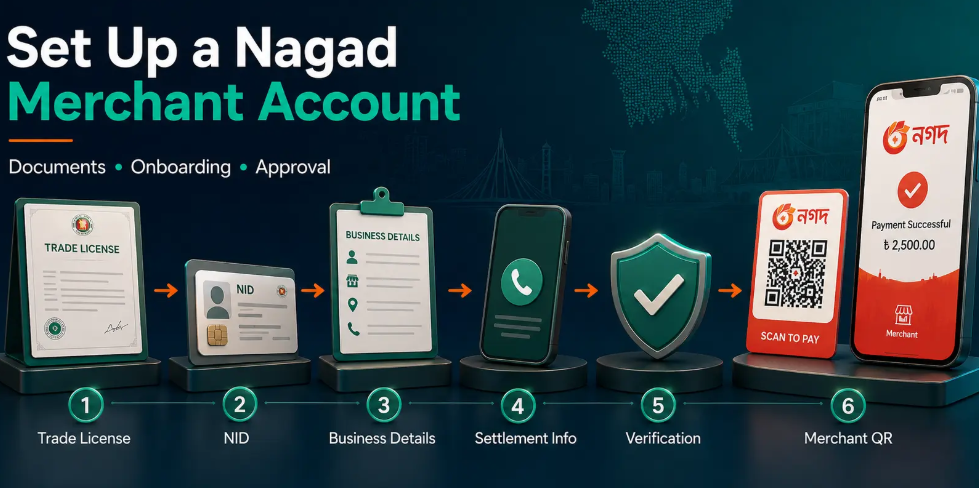
Nagad integration is intended for registered businesses rather than personal accounts. Merchant Know Your Customer (merchant KYC) is the business verification process used to check the company and the people authorized to act for it. Before applying, prepare current business records, authorized representative information, settlement account details, and a clear description of the products or services sold. Missing, inconsistent, or outdated information may prevent the application from moving forward. Requirements and approval decisions can vary by business profile.
Nagad Merchant Account Requirements and Fees
| Check | What the merchant should confirm |
|---|---|
| Nagad merchant account requirements | Prepare current registration or trade documents applicable to the business. Ask which documents, details, and file formats are accepted for a Nagad merchant account. |
| Merchant KYC | Merchant Know Your Customer (KYC) is the business verification process. Provide requested ownership or control information, authorized representative identification, and settlement account details. |
| Business category | Describe the goods or services accurately. Do not assume that every category, sales model, or transaction pattern is eligible. |
| Transaction limits | Request the applicable per-transaction, daily, and monthly caps. Confirm whether limits apply to attempted, successful, or settled payments. |
| Fees | Obtain the current fee schedule for the specific merchant profile. Check transaction, refund, and any other applicable charges before signing. |
| Payment settlement | Payment settlement means the transfer and reporting of collected merchant funds. Confirm the settlement timeline, currency, destination account, cut-off rules, and treatment of weekends or holidays in writing. |
| Reconciliation | Ask which payment, fee, refund, and settlement references appear in reports so finance can match each order to bank receipts. |
Step-by-Step: Integrating Nagad Payment Gateway
- Map the checkout and select a channel. Begin the Nagad payment gateway integration steps by documenting where customers order, how staff identify orders, and when fulfillment starts. Choose the Nagad API for an automated website or application. Use a payment link, QR code, or Telegram request for a no-code or staff-assisted flow.
- Prepare the merchant application. Gather the requested business records, authorized representative details, settlement account information, sales-channel details, and an accurate description of the goods or services. Do not substitute personal account details for business onboarding.
- Confirm operating conditions. Ask for applicable fees, transaction caps, category restrictions, settlement terms, cut-off rules, the refund procedure, and the support path. Record the confirmed terms for finance and customer support.
- Define the order reference. Create a unique reference connecting each customer order, payment request, gateway status, and settlement record. Reused references make duplicate attempts and reconciliation harder to distinguish.
- Configure the Nagad API if automation is required. Follow the supplied documentation and protect credentials in server-side systems. Map pending, successful, failed, canceled, and refunded states to internal order statuses. Verify the authoritative payment result available through the integration rather than fulfilling from a browser redirect.
- Create a payment link for remote sales. Enter the amount and unique order reference, then send the link through the approved customer channel. Staff must still confirm the merchant-side result, prevent duplicate fulfillment, and match the payment to the invoice.
- Set up QR code acceptance. Display the merchant payment QR where customers can scan it without staff copying account details. If the amount is not embedded, verify both the amount and successful merchant-side status before releasing goods.
- Configure Telegram payments if enabled. Keep each request tied to its order reference. Do not accept a customer screenshot or message as proof of payment.
- Test success and failure paths. Check successful payment, cancellation, timeout, repeated submission, incorrect amount, delayed status, and refund handling in the available test or controlled verification environment. Customer messages must not promise success while the merchant record remains pending.
- Launch with defined controls. Decide who may review unresolved payments, initiate refunds, compare settlement records, and contact support. Compare successful payments with orders and settlement reports, and investigate missing or duplicate references before fulfilling an unresolved order.
Fit, Failure, and Best Practices for Nagad Gateway
- Fit: Evaluate Nagad payment gateway fit and failure against the business’s checkout, customer, and operating requirements. Consider the option only when the provider’s current category rules, transaction limits, and settlement terms support the intended Bangladesh workflow.
- Not fit: Do not rely on it alone when the business needs payment methods beyond Nagad, cannot complete Merchant Know Your Customer (KYC) verification, or expects order values above its confirmed account limits. This method does not replace a cross-border payment acceptance plan.
- Channel choice: Use a payment link for remote orders, a merchant payment QR code for staff-assisted checkout, or an API when confirmed payment status must update orders automatically. Skip custom integration if no one can maintain credentials, status handling, and monitoring.
- Common setup mistakes: Avoid submitting personal account details during business onboarding, exposing API credentials, reusing order references, or launching without testing pending, canceled, duplicate, and incorrect-amount cases. Check that business names and settlement account details are consistent across the records requested for onboarding.
- Common operating mistakes: Define merchant best practices as internal procedures rather than provider guarantees. Staff should not fulfill an order from a screenshot, treat a pending status as successful, split a refused payment to evade a limit, or promise an unconfirmed refund date. The merchant should decide who reviews refunds, unresolved payments, settlement reconciliation, and escalation; the appropriate control depends on its staffing and risk model.
- Chargeback and dispute limits: A chargeback is a payment reversal initiated through the applicable payment provider or financial institution. Do not assume that wallet payments follow card chargeback procedures. Confirm the available dispute, reversal, and refund processes for the merchant account before stating them in customer policies.
- Limits and freshness: Availability, fees, limits, documentation, and settlement conditions may vary by merchant profile or change after publication. Reviewed September 15, 2026; this guidance does not establish current account terms. Verify the onboarding documents and account-specific instructions before launch.
Comparing Payment Link, QR, and API for Nagad Acceptance
The Nagad payment link vs QR vs API decision starts with where the order is created and who confirms payment. A Nagad payment link fits remote sales, invoices, and social-commerce orders. Staff can create and share a request without building a checkout. The tradeoff is operational: each link still needs a unique order reference, an expiration or cancellation process, and merchant-side status verification.
A merchant-presented QR code, also called a merchant QR, is a business payment code displayed for customers to scan. It suits in-person retail, events, pickup counters, and other point-of-sale flows. If staff enter or verify the amount manually, train them to match the paid amount and reference before handing over goods. A customer confirmation screen should not replace the merchant’s status.
API integration is appropriate when an e-commerce or SaaS platform must create requests, receive status changes, and update orders automatically. It requires development, credential protection, monitoring, and handling for duplicate callbacks or pending states. The merchant decision should therefore consider automation needs, order volume, technical ownership, reconciliation effort, and failure recovery—not only launch speed. A business can begin with no-code acceptance and reassess the API when manual work becomes difficult to control.
Handling Payment Failures and Edge Cases
Nagad payment failure scenarios require merchants to separate a failed status from a pending or unverified one. If the payer cancels or the merchant record shows a Nagad payment failure, keep the order unpaid and offer a fresh payment request only after checking that the first attempt cannot complete. If the status is pending, do not issue goods, mark the invoice paid, or ask the customer to retry immediately. Verify the final gateway status first.
When an attempt exceeds an applicable limit or conflicts with an account control, it may be refused. Practical merchant advice is to confirm the account’s actual limit and reason for refusal rather than split the charge or repeatedly resubmit it. Resolve business-category restrictions through onboarding or support instead of trying to work around them.
For a refund, confirm that the original transaction was successful, record the amount and reason, and follow the available merchant process. Do not promise a completion date unless the provider has supplied one for that case. If the customer raises a dispute, retain the order reference, payment status, fulfillment evidence, and communications. Under payment card rules, a payment card chargeback is a formal reversal initiated through a card network’s dispute process.
Merchants should not assume that this card chargeback process applies to Nagad wallet payments. Ask the provider which Nagad dispute, refund, or adjustment procedure applies and what evidence is required. Reconcile the result against the settlement record, meaning the merchant’s record of completed payment amounts and adjustments.
Before enabling Nagad, document the intended channel, average order pattern, business category, expected limits, settlement needs, and internal responsibility for reconciliation and refunds. Then compare those requirements with the terms offered for the merchant account.
Paykassma can be evaluated for payment links, QR codes, Telegram payment requests, or API-based acceptance. Availability and account conditions should be confirmed during business onboarding. Ask for the applicable requirements, fees, limits, settlement terms, integration documentation, and failure-handling process in writing. This article does not promise approval, unrestricted transaction capacity, or a fixed settlement timeline; those decisions depend on the merchant profile and agreed service terms.